Prompt regression testing means running a fixed set of inputs through your prompt on every change and checking that the scores didn't get worse. Drift-CI does this inside your pull request: it scores each case, compares it to a baseline committed in your repo, posts the deltas as a PR comment, and fails the check when a case drops past your threshold.
What prompt regression testing is
A prompt is code that runs on someone else's computer with non-deterministic output. You can't assert on the exact text, but you can assert on properties of it: the label is right, the JSON validates, the reply follows a rubric, the model declines what it should decline. Each of those becomes a test case with an evaluator that returns a score between 0 and 1.
A regression is a case whose score falls meaningfully below what it scored last time you agreed the behaviour was correct. That "last time" is the baseline, and the whole practice rests on having one per case. The LLM regression testing guide covers the wider practice: building the dataset, choosing evaluators and keeping evals from getting flaky.
Why manual spot-checks miss regressions
When you edit a prompt you usually test the case that prompted the edit. It gets better, you ship. The cases you didn't look at are where the damage hides: a stricter tone rule that makes refusals over-trigger, a format instruction that breaks a downstream parser, a new example that the model starts copying verbatim.
Spot-checks also don't leave a record. Nobody can tell from the merged diff which inputs were tried, what the model said before, or whether anything got worse. A suite that runs on every PR answers all three.
How Drift-CI catches regressions
The Drift-CI GitHub Action runs on pull_request. For each case in .drift/suite.yaml it:
- sends the input (and optional
systemPrompt) to your provider, at temperature 0 (except Claude models from the 4.7 generation on, which reject sampling parameters); - scores the response with the case's evaluators, combined into one weighted score;
- compares that score with the committed baseline at
.drift/baseline/<case-id>.json; - marks the case as a regression if the score dropped by more than the threshold, or an improvement if it rose by more.
It then posts one PR comment, updated in place on each push, with a row per case: score, delta against the baseline, and latency. If any case regressed, the check fails, so branch protection can block the merge.
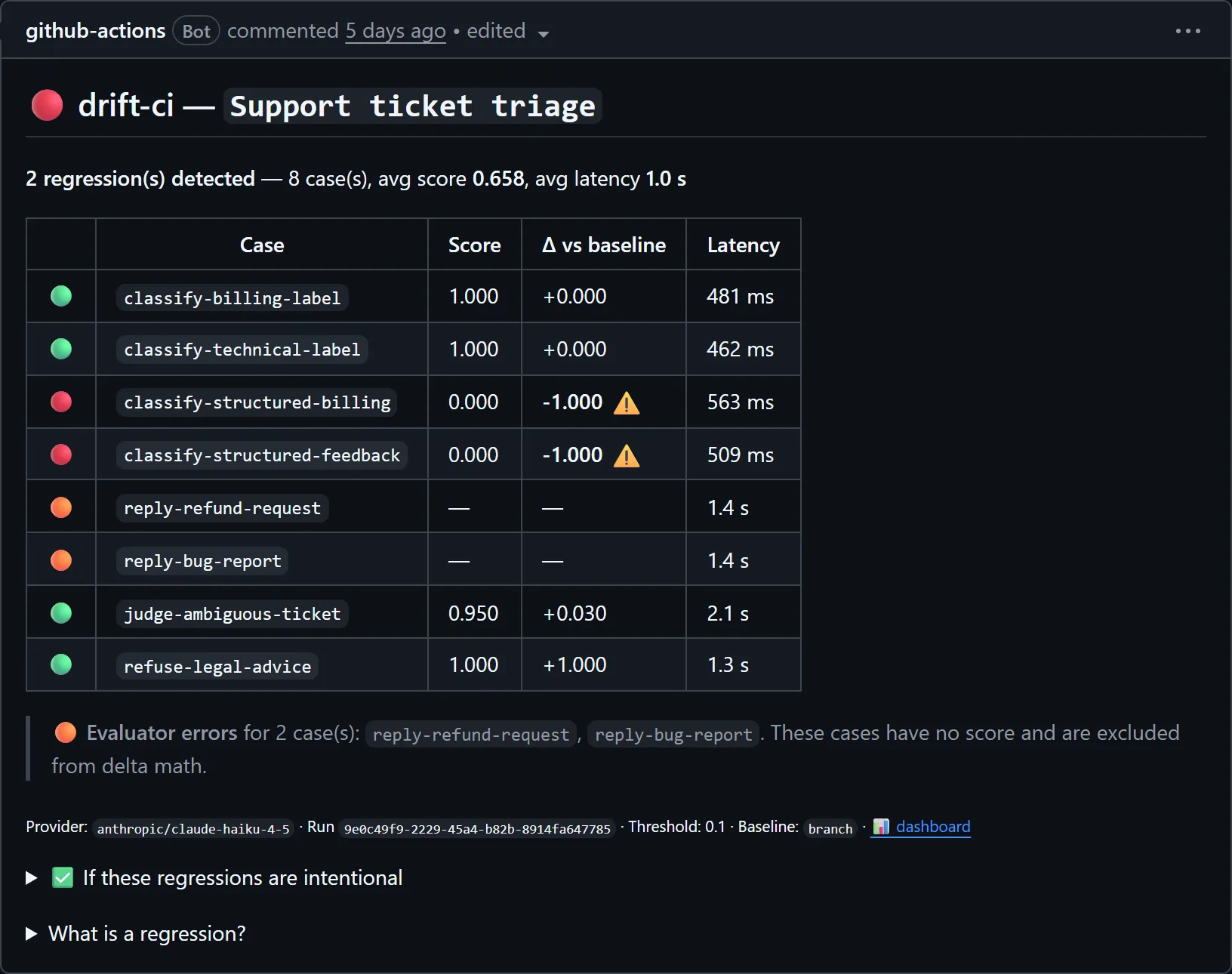
That comment is from a real pull request in our dogfood repo, which tests a support-ticket triage prompt. The PR tried a cheaper model. At the default threshold of 0.1, both structured classification cases fell from 1.000 to 0.000 and failed the check, two rubric-graded reply cases couldn't be scored (shown as evaluator errors, not regressions), and the bare-label cases held.
Provider errors are never counted as regressions; the guide's section on flakiness and outages explains how Drift-CI handles them.
Baselines as code
Baselines are plain JSON files in .drift/baseline/, one per case, holding the score, the output and a hash of the case definition. They are committed like any other file, so they go through code review.
When a change is intentional (a better answer, a new format) you run the suite locally, accept the new behaviour for the cases you checked, and commit it in the same PR:
npx @drift-ci/cli run
npx @drift-ci/cli baseline accept .drift/suite.yaml --cases classify-structured-billing
git add .drift/baseline && git commit -m "accept baseline updates"
baseline accept reads the most recent local run. Pass a comma-separated list to --cases, or --all to accept every case. The reviewer then sees the old and new outputs side by side in the diff, which is where "is this actually better?" gets decided. There's no hidden server state and no promote button.
If you edit a case itself (its input, expected output, system prompt, evaluators or threshold), Drift-CI notices that the baseline was captured against a different definition. It flags the baseline as stale in the PR comment instead of calling it a regression, and tells you to re-accept it.
What a regression looks like in the dashboard
Synced to drift-ci.com, every run keeps its per-case outputs. The case page shows the score over time and a diff of the output against the previous run, so you can see what the model actually started saying.
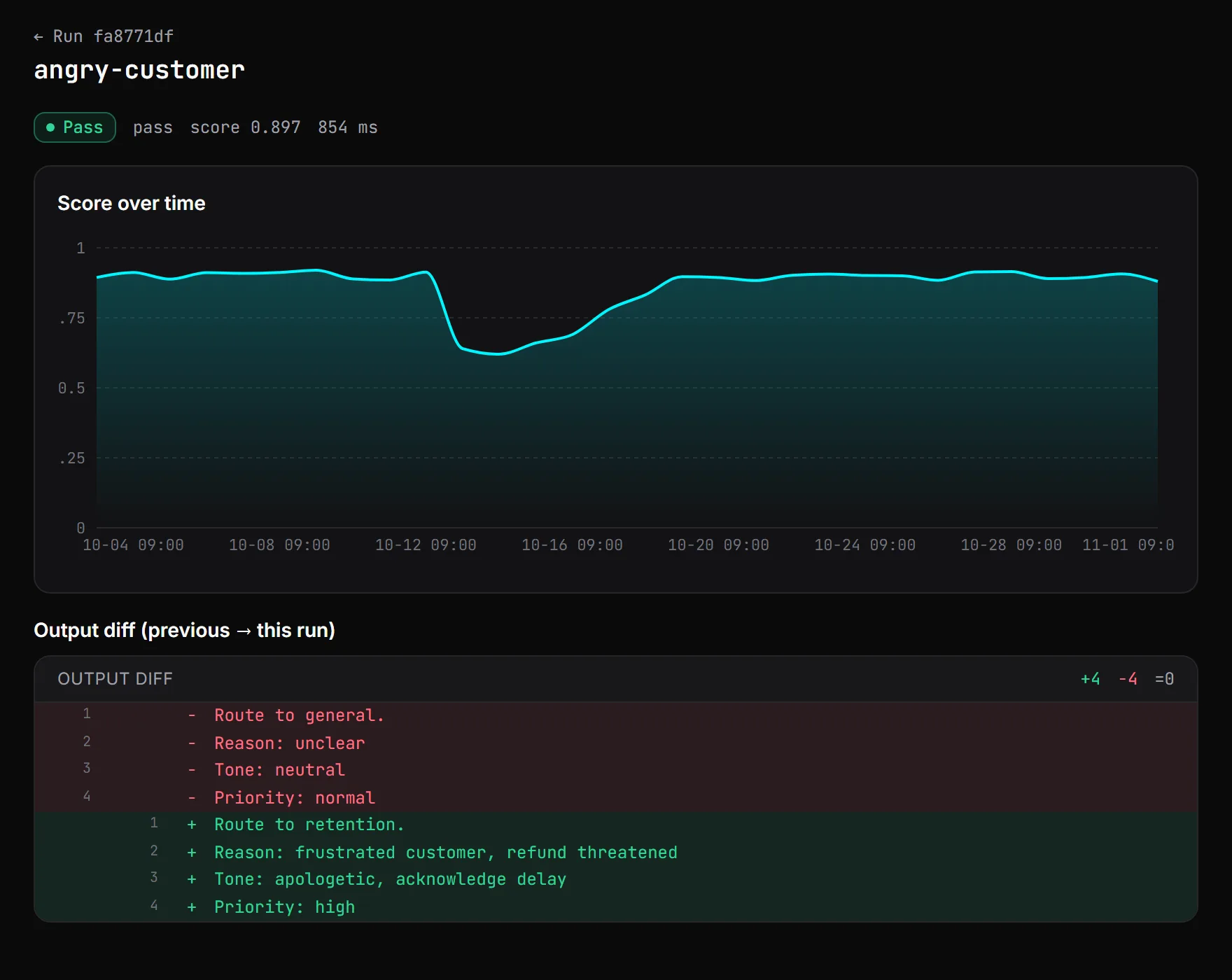
On the Team plan, each regressed case also opens an issue. You can assign it, discuss it, and resolve it once a fix lands. If the case regresses again after you resolved it, the issue reopens on its own.
Getting started
In the dashboard, Import from GitHub → Open setup PR adds the config, a starter suite and the workflow for you; add your API key secret, replace the starter case and record baselines. To set it up by hand, follow the GitHub Actions tutorial.
If your output is structured, start with testing LLM JSON output, which covers the json-schema evaluator. If you're about to change models rather than prompts, see testing an LLM model upgrade.