This tutorial shows how to run LLM evals in GitHub Actions on every pull request. By the end, each PR that touches your prompts runs a test suite against your model, compares every score with a baseline committed in the repo, posts the results as a PR comment, and fails the check if anything regressed. It uses Drift-CI, which is open source.
If you're new to the idea, the LLM regression testing guide explains why it works this way. This post is the hands-on version.
What you'll build
- A
.drift/directory with a config file, a suite of test cases and their committed baselines. - A workflow that runs the suite on
pull_request. - A PR comment with a score, delta and latency for every case.
- A failing check when a case drops past the regression threshold.
- Optionally, every run synced to a drift-ci.com dashboard.
You need Node.js 22 or later locally, a GitHub repository and an API key for your model provider. The examples use Anthropic; Drift-CI also supports OpenAI, Azure OpenAI, Bedrock, Google Gemini, Vertex AI and Ollama.
Step 1: scaffold .drift/
From the root of your repository:
npx @drift-ci/cli initThis creates .drift/config.yaml, .drift/suite.yaml, .drift/.gitignore and an empty .drift/baseline/ directory. The defaults are Anthropic and claude-sonnet-4-5; pass --provider and --model to change them. The generated config:
version: 1
provider:
  name: anthropic
  model: claude-sonnet-4-5

storage:
  type: json-file

thresholds:
  regression: 0.10
  alert: 0.20

baseline:
  source: branch

concurrency: 5
timeoutMs: 30000

suite: .drift/suite.yaml
thresholds.regression is the score drop that counts as a regression. baseline.source: branch compares each PR against the baselines committed on the PR's own branch, which is what lets a PR accept an intentional change.
Step 2: write your first cases
Replace the starter case with inputs from your product. These two are from our dogfood suite, which tests a support-ticket triage agent. The first checks a classifier with an exact answer; the second grades a drafted reply against a rubric:
version: 1
id: triage
name: Support ticket triage

cases:
  - id: classify-technical-label
    tags: [classification, exact-match]
    systemPrompt: |
      You are a support-ticket classifier. Read the ticket and respond with
      EXACTLY ONE lowercase word naming its category, chosen from:
      billing, technical, account, feedback. Output only that word.
    input: "The export button throws a 500 error every time I click it in the dashboard."
    evaluators: [exact-match]
    expected: "technical"

  - id: reply-bug-report
    tags: [reply, rubric-checklist]
    systemPrompt: |
      You are a warm, concise customer-support agent for a SaaS product.
      Draft a reply to the customer's bug report. Acknowledge the problem,
      ask for one concrete detail that would help reproduce it, and set a
      realistic expectation. Never promise a specific fix date.
    input: "Your mobile app crashes whenever I open the settings screen."
    evaluators: [rubric-checklist]
    rubric:
      - text: "Acknowledges the crash and apologises briefly."
        mode: strict
      - "Asks for at least one concrete reproduction detail (device, OS, steps)."
      - text: "Does NOT promise a specific fix date."
        mode: strict
      - "Stays warm and professional in tone."
Rubric and judge cases need a judge model, and it should be a different one from the model under test (rubric-checklist requires it). Add it to .drift/config.yaml:
judge:
  provider: anthropic
  model: claude-haiku-4-5
  allowSelfBias: false
Now run the suite locally and record the first baselines:
export ANTHROPIC_API_KEY=...
npx @drift-ci/cli run
npx @drift-ci/cli baseline init .drift/suite.yaml
git add .drift && git commit -m "add drift-ci suite and baselines"
baseline init writes a baseline for every case that doesn't have one yet, from the most recent run. Read the outputs before you commit them: from here on, they are what "correct" means.
Step 3: run the LLM evals in GitHub Actions
Create .github/workflows/drift.yml. This is the workflow our dogfood repo runs on every PR:
name: drift
on:
  pull_request:

permissions:
  contents: read
  pull-requests: write
  id-token: write   # keyless drift-ci.com sync via GitHub OIDC

jobs:
  drift:
    runs-on: ubuntu-latest
    steps:
      - uses: actions/checkout@v4
        with:
          fetch-depth: 0          # full history so origin/main is present for
                                  # baseline-source diffs + baseline-changed detection
      - uses: Drift-CI/drift-ci@v1
        with:
          provider: anthropic
          api-key: ${{ secrets.ANTHROPIC_API_KEY }}
          dashboard-url: https://drift-ci.com   # keyless: no dashboard-token needed
          # suite/config default to .drift/suite.yaml + .drift/config.yaml
          # baseline-source defaults to `branch` (the PR's committed baselines)
          # fail-on-regression + post-comment default to true
        env:
          # The action reads process.env.GITHUB_TOKEN to post the PR comment.
          # Without this the comment is silently skipped.
          GITHUB_TOKEN: ${{ secrets.GITHUB_TOKEN }}
A few lines matter more than they look:
pull-requests: writeand theGITHUB_TOKENenv var let the action post its comment. Without the token the comment is skipped.fetch-depth: 0fetches full history so the action can diff.drift/baseline/against the base branch.id-token: writeanddashboard-urlare only for dashboard sync (step 6). Leave both out if you don't want it.
Step 4: add the API key secret
In the repository, open Settings → Secrets and variables → Actions and add a secret named ANTHROPIC_API_KEY with your key. Use the secret name that matches your provider and the api-key line in the workflow.
Step 5: open a pull request and read the comment
Change a prompt or a case and open a PR. The action runs every case, compares it with its baseline and posts a comment. Here is a real one from our dogfood repo, from a PR that tried a cheaper model:
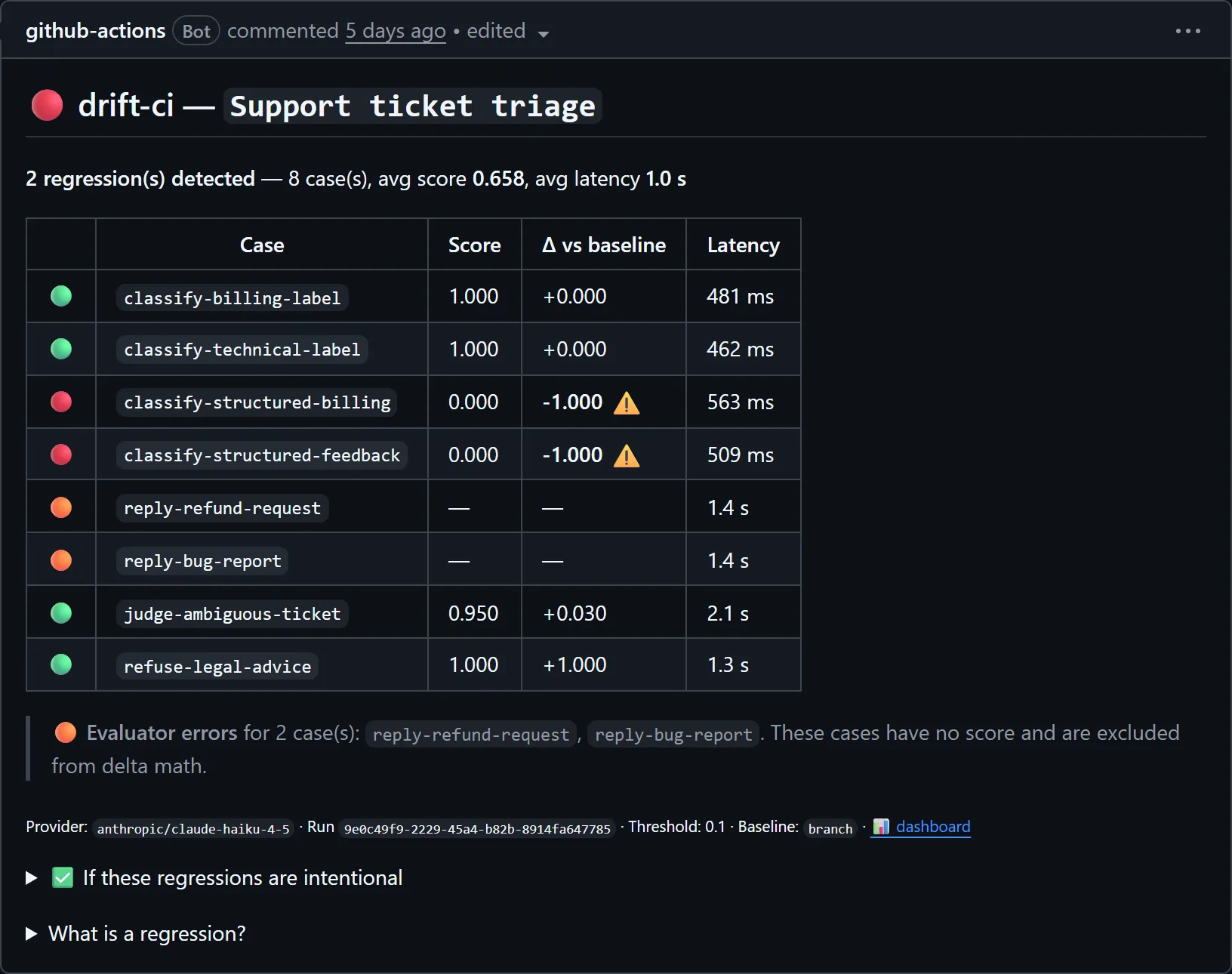
Each row shows the case, its score, the delta against the baseline and the latency. Here the two structured classification cases fell from 1.000 to 0.000, past the 0.1 threshold, so they're red and the check failed. The two orange rows are evaluator errors: cases that couldn't be scored, which never count as regressions. Later pushes update the same comment instead of adding new ones.
If the change is intentional, run the suite locally, accept the new baselines for those cases, and push them to the PR:
npx @drift-ci/cli run
npx @drift-ci/cli baseline accept .drift/suite.yaml --cases reply-bug-report
git add .drift/baseline && git commit -m "accept baseline updates"
The next run compares against the new baselines, so the check passes if nothing else regressed, with the output change visible in the PR diff for review. Prompt regression testing covers this review loop in more detail.
Step 6 (optional): sync runs to the dashboard
The PR comment shows one run. A dashboard keeps all of them, with run history, per-case score charts and output diffs between runs. There are two ways to connect.
Keyless, with the GitHub App. Install the Drift-CI GitHub App and connect the repository to a project on drift-ci.com. The workflow above then syncs with a short-lived GitHub OIDC token: that's what id-token: write and dashboard-url are for. There is no ingest secret to create or rotate.
With a token. In your project's Connect your CI panel, create an ingest token, add it as the DRIFT_PROJECT_TOKEN secret, and pass it to the action as dashboard-token.
The shortcut. In the dashboard, choose Import from GitHub, pick a repository, and click Open setup PR. Drift-CI opens a pull request that adds .drift/config.yaml, a starter .drift/suite.yaml and a keyless workflow, which covers steps 1 to 3. You still add the API key secret, replace the starter case and record baselines.
Troubleshooting
Runs on fork PRs are skipped. GitHub doesn't give pull_request workflows from forks access to secrets, so there is no API key. The action skips cleanly and leaves a comment explaining why, rather than failing the check.
There's no PR comment. Check the pull-requests: write permission and the GITHUB_TOKEN env var on the step.
The log warns that baseline-changed detection failed. Use fetch-depth: 0 on the checkout step so the base branch is available.
Dashboard sync fails with a 403 and an HTML page. If your dashboard sits behind bot protection, GitHub-hosted runners can get a challenge page ("Just a moment…") instead of an API response. We hit exactly this when we launched drift-ci.com: the fix was turning off Cloudflare's Bot Fight Mode for the ingest endpoint's zone. Sync failures are reported as warnings and never fail your check, so watch the action log after the first synced run.
The run aborted with a transient-error message. Rate limits, timeouts and network errors are never counted as regressions. When enough cases hit them in one run, Drift-CI aborts and says the provider is the likely cause. Re-run the job once the provider recovers.
Next steps
- Add a case for every production failure you fix.
- Add a nightly scheduled run of the same suite to catch provider-side changes; LLM drift monitoring shows the workflow.
- Read the LLM regression testing guide for choosing evaluators and thresholds.